Testing
Comprehensive testing is crucial for maintaining the reliability and stability of the Anemoi packages. This guide outlines our testing strategy and best practices for contributing tests.
We use pytest as our primary testing framework. Pytest offers a simple and powerful way to write and run tests for Python projects. For more details, refer to the pytest documentation.
Types of Tests
Unit Tests
Test individual components in isolation.
Should constitute the majority of test cases.
Unit tests reside in tests/ or, for packages with integration tests, in tests/unit
Integration Tests
Test how different components work together.
Important for data processing pipelines and model training workflows.
Integration tests reside in tests/integration.
System-level Tests
Test the anemoi packages as a whole, including end-to-end workflows, from dataset creation to model training and inference.
These tests ensure that the packages work together as expected.
The system-level test suite is located in the anemoi repository in the tests/system-level directory.
Running Tests
Ensure that you have the testing dependencies installed. You can do this by running:
pip install -e .[test]
We use the pytest-skip-slow plugin to skip slow tests by default.
To run all unit tests:
pytest
To run tests in a specific file:
pytest tests/unit/test_specific_feature.py
To run all integration tests, including slow-running tests, use the –slow flag. Follow the package-specific instructions. For integration tests in anemoi-training, for instance, ensure that you have GPU available and run:
pytest training/tests/integration/ --slow
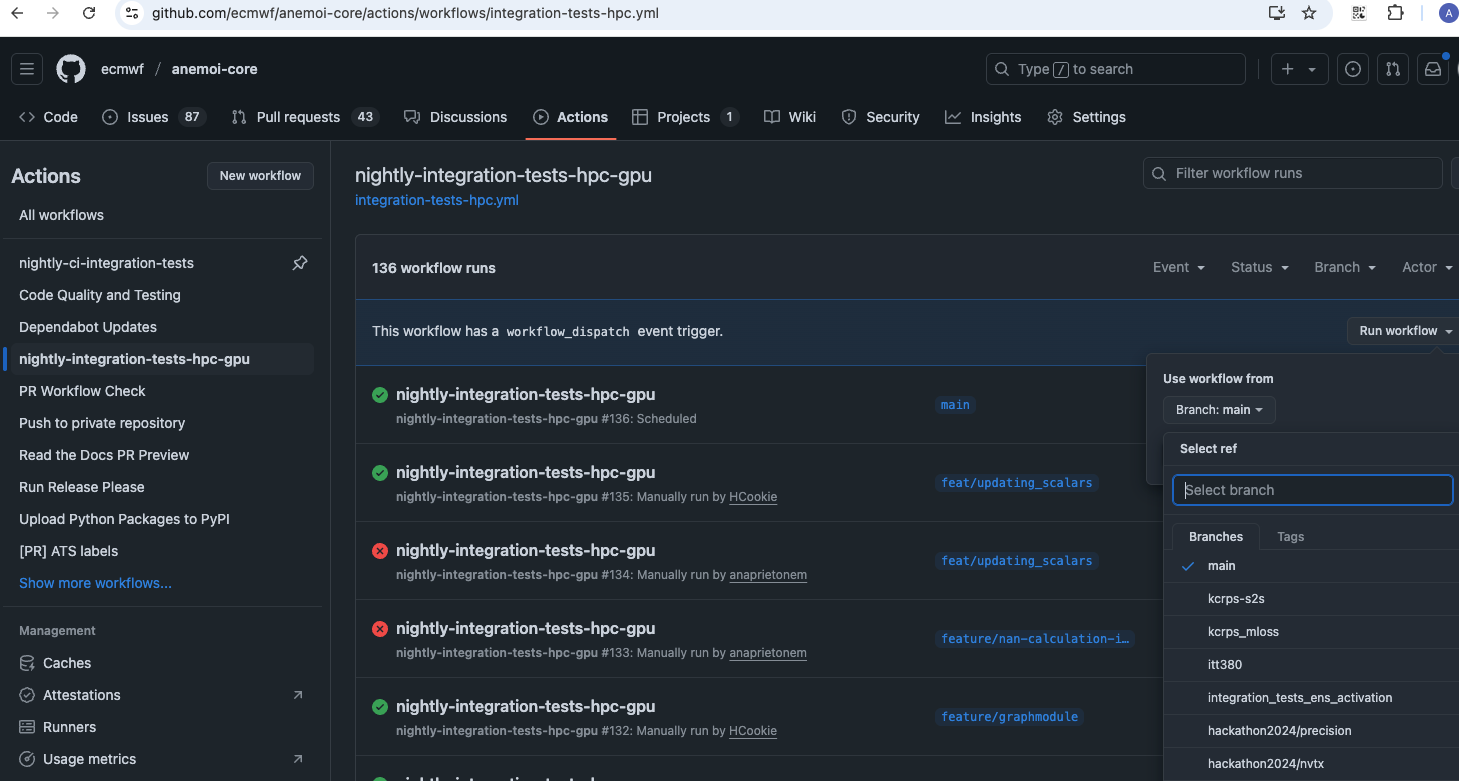
Integration tests can also be triggered from the Github Actions
interface. To do so, one needs to navigate to the Github Actions tab
under the corresponding anemoi package and then select from the list on
the left the workflow (for example
nightly-integration-tests-hpc-gpu). Next, one needs to select the
branch from which to trigger this workflow from the dropbox list on the
right and finally a green button showing Run workflow will appear
and once clicked would trigger this worfklow. Please refer to Github
docs for more information.
Note
To trigger these workflows, users must be members of the ‘ecmwf’ GitHub organization and have ‘write’ permissions
To run system-level tests, navigate to the anemoi repository on github and trigger the workflow on-demand-system-level-test via the GitHub Actions tab.
Note
Do not trigger system-level tests if another system-level test workflow is already running under your user account. This is to avoid ecflow zombies when replacing a suite that is already running.
If you need to replace a running suite, please wait for it to finish or cancel it first.
Continuous Integration
The unit tests run automatically on every push to a pull request. The
expensive integration tests do not: they occupy GPUs on the shared HPC
allocation, so running them on every work-in-progress commit would be
wasteful. In anemoi-core they are instead opted into per pull
request, using a label.
The Labels
A pull request must carry one of the following two labels before it can be merged:
run-expensive-testsThe expensive integration tests run on HPC for every push to the pull request (workflow
nightly-integration-tests-hpc-gpu, see Running Tests for how to trigger it manually).expensive-tests-not-neededOpt out. Use this only for changes that cannot affect training or inference behaviour, such as documentation, or changes confined to unrelated packages.
The point of the labels is that the decision is recorded explicitly: every pull request states whether the expensive tests were needed, and nothing is merged simply because nobody thought about it.
If neither label is set, the check expensive-tests-label stays
pending rather than failing. A pending required check greys out the
merge button without adding a red cross, so a missing decision never
looks like a failing test.
Suggested Workflow
While drafting, leave both labels off and iterate on the fast unit tests only.
Once the pull request is close to its final state, add
run-expensive-testsso that the expensive tests run against the code that will actually be merged.To go back to fast iteration, remove
run-expensive-testsagain. Removing the label re-evaluates the checks, so an earlier verdict does not linger on the pull request.Before merging, make sure that the label that is set still reflects the current state of the pull request, and that the expensive tests are green if they were requested.
Note
Pull requests from forks additionally require a maintainer to add the
approved-for-ci label, since the tests run code from the pull
request on ECMWF HPC. This approval is revoked whenever new commits
are pushed and has to be granted again.
This is true for unit and integration tests alike.
Note
Pull requests opened by automation (for example DeployDuck or
pre-commit-ci) are exempt from the label gate.
Writing Tests
General Guidelines
Write tests for all new features and bug fixes.
Aim for high test coverage, especially for critical components.
Keep tests simple, focused, and independent of each other.
Use descriptive names for test functions, following the pattern test_<functionality>_<scenario>.
Follow the Dataset naming conventions for test files.
Keep tests fast: Optimize slow tests or mark them for separate execution.
Use appropriate assertions: pytest provides a rich set of assertions.
Test edge cases and error conditions, not just the happy path.
Regularly review and update tests as the codebase evolves.
Document complex test setups or scenarios.
By following these guidelines and continuously improving our test suite, we can ensure the reliability and maintainability of Anemoi Training.
Example Test Structure
import pytest
from anemoi.training import SomeFeature


def test_some_feature_normal_input():
    feature = SomeFeature()
    result = feature.process(normal_input)
    assert result == expected_output


def test_some_feature_edge_case():
    feature = SomeFeature()
    with pytest.raises(ValueError):
        feature.process(invalid_input)
Tests features
Here are some pytest features commonly used in the Anemoi packages.
Pytest’s parametrize decorator can be used to run the same test with different inputs.
@pytest.mark.parametrize(
    "input,expected",
    [
        (2, 4),
        (3, 9),
        (4, 16),
    ],
)
def test_square(input, expected):
    assert square(input) == expected
Pytest’s fixtures can be used to set up common test data or objects.
@pytest.fixture
def sample_dataset():
    # Create and return a sample dataset
    pass


def test_data_loading(sample_dataset):
    # Use the sample_dataset fixture in your test
    pass
Mocking external dependencies or complex objects can be achieved using unittest.mock or pytest-mock.
def test_api_call(mocker):
    mock_response = mocker.Mock()
    mock_response.json.return_value = {"data": "mocked"}
    mocker.patch("requests.get", return_value=mock_response)

    result = my_api_function()
    assert result == "mocked"
Test Coverage
We use pytest-cov to measure test coverage. To check coverage:
pytest --cov=anemoi_training
Aim for at least 80% coverage for new features, and strive to maintain or improve overall project coverage.
Writing Integration Tests
Marking Long-Running Tests
For slow-running integration tests, we use the –slow flag to ensure that they are run only when necessary. This means that you should add the correspondong marker to these tests:
@pytest.mark.slow
def test_long():
      pass
Configuration Handling
Integration tests in anemoi-training, anemoi-datasets, etc., rely on appropriate handling of configuration files. Configuration management is essential to ensure that the tests remain reliable and maintainable. Our approach includes:
Using Configuration Templates: Always start with a configuration template from the repository to minimize redundancy and ensure consistency. We expect the templates to be consistent with the code base and have integration tests that check for this consistency.
Test-specific Modifications: Apply only the necessary use-case-specific (e.g. related to the dataset) and testing-specific (e.g. batch_size or restricted date range) modifications to the template.
Reducing Compute Load: Where possible, reduce the number of batches, epochs, batch sizes, number of dates etc.
Debugging and Failures: When integration tests fail, check the config files (e.g. in training/src/anemoi/training/config) for inconsistencies with the code and update the config files if necessary. Also check if test-time modifications have introduced unintended changes.
For more details and package-specific examples, please refer to the package-level documentation.
Adding a Test Case in the System-level Test Suite
To add a test case in the system-level test suite, you need to add config files in the relevant directory in the anemoi repository. The config files should be placed in the tests/system-level/configs directory as explained below. They will constitute tasks in the system-level test suite. No pyflow knowledge is required to add new test cases.
Dataset Creation Test cases
To add a new test case for dataset creation create a new folder in the tests/system-level/anemoi_test/configs/datasets directory. The name of the folder will be the name of the test case and of the dataset created. In the folder add
a dataset_config.yaml file with the configuration for the dataset creation. Currently, the only source supported in the test suite is mars.
a task_config.yaml file that specifies additional information required to configure the task in the suite. The task config should specify the anemoi_command to be used to create the dataset – typically, “anemoi-datasets create”. Hardware overrides (e.g. path to the dataset_config.yaml file) will be set in the suite.
If you need additional flexibility in configuring your test case, please open an issue in the anemoi repository.
Model Training Test cases
To add a new test case for model training, create a new folder in the tests/system-level/anemoi_test/configs/training directory. The name of the folder will be the name of the test case. In the folder add
a training_config.yaml file with the configuration for the model training. The configuration should be a full config file, i.e. not require hydra to build a config based on defaults. The dataset names should match the names of datasets created in the previous part of the suite. (If you want to test training based on an existing anemoi-dataset, consider adding an integration test in the anemoi-training package instead.)
a task_config.yaml that specifies additional information required to configure the task in the suite. The task_config.yaml should contain a list of dataset names that are required for the training task. The names should match the names of the datasets specified in the training_config.yaml. The task_config.yaml should also specify the anemoi_command to be used to run the training – typically, “anemoi-training train”. Hardware overrides (e.g. path to the training_config.yaml file) will be set in the suite.